
School Starts Soon: What's Next?
These pages are primarily for new, campus-based, undergraduates in the College of Arts and Sciences (CAS), in the College of Business (CoB), and in the College of Music and Media (CMM).
This page exists to share all necessary, time-sensitive, next-steps for new-students so that all may set their expectations accordingly: Please bookmark it now so you can visit it as much as needed until you’re fully onboard, and ready to start school with a finalized schedule on Tuesday, January 19, 2027.
- There are some things you must do now/as early as possible.
- There are other things that matter the most in the first two weeks of each semester.
- There are additional things to be aware of for later in your first term.
If you have any questions after reading this page, email any of the advisors listed in your LORA account (these are often the folks who draft your 1st-semester schedule), or the head of your program or department, or the college-level advisors in your Dean's office.
Finding Contact Information on loyno.edu: In the upper-right corner of the homepage (or any loyno.edu webpage), see the links for Resources and Log In To... hover your mouse to reveal the menu options.
- Your primary advisor/s and their contact info will be listed in your LORA account. LORA Self-service is found in the Single-Sign-On. You have to set up all of your accounts to reach LORA (see the Registration Agreement instructions below for how to get to this area).
- Every department webpage has a Faculty/Staff tab that gives the complete contact listings for everyone in the department. Try googling your department name plus the word "faculty" and follow the links... There is also a Search Box at the top of every Loyola webpage.
- To search for faculty or staff by first or last name, click here: https://www.loyno.edu/search/people
COLLEGE CONTACTS
- University Honors Program, all Colleges, Dr. Sean Cain, scain@loyno.edu
- College of Arts and Sciences
- CAS degree-plans unless Honors, Pre-Nursing, or Tulane Scholars: Last names A-J, Sara Clark, srclark@loyno.edu
- CAS degree-plans unless Honors, Pre-Nursing, or Tulane Scholars: Last names K-Z, Ed Crago, edcrago@loyno.edu
- CAS Pre-Nursing, Nicholas Jackson, nbjackso@loyno.edu
- Tulane Scholars, last names A-J, Katie McBride (SSC), kamcbrid@loyno.edu
- Tulane Scholars, last names K-Z, Lesli Rambin (SSC), larambin@loyno.edu
- College of Business
- New First Year Students: Brittany Heims, bdheims@loyno.edu and Bridget Adam, bdadam@loyno.edu
- Melissa Ridley, amcoto@loyno.edu, transfers and readmits
- College of Music and Media, Laura Jayne, ljayne@loyno.edu
BUT FIRST: Always put your full name and ID# in the Subject of the email when requesting assistance or information.You can find this in your LORA account if you have deposited, and have already set up your Gmail, Microsoft, and SSO accounts (see further down the page).
Before School Starts
Priority Deadline for the Academic Registration-Advising and Involvement Interest Survey (Time-Sensitive - this is how to get Registered during the very first phase of new-student registration.)
Accept your Registration Agreement (Aka the Policies, Responsibilities, and Expectations Agreement. Time-Sensitive - set up all of your Loyola accounts, sign your Agreement, see your schedule. This is how to stay Registered as we get closer to the first day of classes, and how to get registered if you join us on or after December 11, 2026.)
Update or Affirm your Emergency Contacts (Time-Sensitive - needed annually.)
Math Placement (Time-Sensitive - broken down according to Major and by Math requirement, but great news, you may already have established your placement if you ever needed to in the first place. Many do not need to do so at all!)
English Placement (This sections explains Loyola's Composition and Writing About Literature conventions.)
Language Placement (Time Sensitive - depends upon degree-requirements by Major, and by previous experience.)
Send Transcripts and Score Reports to Admissions (admit@loyno.edu) (Time-Sensitive - very likely to impact your 1st semester schedule in your favor!)
- Transfer and Advanced Placement FRIENDLY! (See our chart to get a sense of how your incoming credits can count for your degree-requirements so that you do not accidentally repeat coursework.)
Request Changes to your Draft Schedule (Time-Sensitive -- the earlier you begin fine-tuning your schedule with your registration advisor, the better for you.)
During the First Two Weeks
The Academic Calendar: What to do and WHEN (Time-Sensitive)
Dropping versus Withdrawing from Classes (Time-Sensitive)
Satisfactory Academic Progress
Later in the First Semester
Your First "Solo" Registration for Next Semester
Degree-tracking aka How to Graduate
Finding the Classes that can Fulfill your Loyola Core Requirements
How to Get Things Done During your College Career
- - - - - - - - - - - - - - - - - - - - - - - - - - - - - - - - - - - - - - - - - - - - - - - -
Before School Starts
Priority Deadline for the Academic Registration-Advising and Involvement Interest Survey (Time-Sensitive - this is how to get Registered during the very first phase of new-student registration.)
We are so glad that you have joined the Wolf Pack -- are you ready to be scheduled in your classes? Loyola uses a detailed, pre-registration survey to ensure that you get full credit for your dual-enrollment, transfers, AP, Cambridge, CLEP, Dantes/DSST, and IB.
- Dedicated advisors register on your behalf in your first term: This helps you get full credit for your previous college-level work; it helps us prevent your taking unnecessary, duplicate, classes; it provides your registration-advisor with everything you would want them to know about you while crafting your first schedule; it connects you with other offices as appropriate including the Office of Accessible Education (for those who may need assistance with accommodations) and Student Life and Ministry (for those with interest in extracurricular organizations and commuter student-culture); and more, including scheduling conflicts, overall academic goals, and career plans.
- Our advising model helps you have your best, first-semester EVER, and helps ensure your on-time graduation.
OVERALL INSTRUCTIONS + TIMELINE
The Advising-Registration survey opens in late September for Spring 2027 new-students: If you have deposited (and if it is before 12pm, Central Standard time on Wednesday, November 18, 2026), it will be in your post-deposit checklist in the Admissions Portal here: https://admissions.loyno.edu/apply/status
- Use your pre-Loyola (personal) login information to get there.
- Students who submit their surveys are registered ahead of everyone else when new-student registration opens mid-November, 2026.
- Surveyed-students who completed the survey the same week that registration begins (or later) will hear from their advisor within about two weeks of submitting their information.
- Complete the survey no later than the Priority Registration Deadline: 12pm, Central Standard time on Wednesday, November 18, 2026. It cannot be accessed after this, but fear not!
- In order to facilitate early-billing and to give maximum time to finalize everyone's financial aid needs, Advising will strive to have all known, deposited students registered before Thanksgiving. See lower down on this page for additional billing and financial aid details.
- Registrations will be ongoing for students who join Loyola after the priority-survey deadline and after Thanksgiving. For those who may have deposited post-survey: If you got a schedule without submitting a survey, you're all set! You may continue to fine-tune your schedule as needed with your faculty advisor.
- New-student registrations will pause over Thanksgiving and from December 21st through January 3rd, 2026.
- You'll know that your draft-schedule is in place when it appears in your LORA account in the Student Planning tile (can take 2-3 days post-deposit for this tile to appear), and/or you receive your dedicated-advisor's onboarding letter:
- Work with them over email immediately after that to fine-tune your classes as quickly and efficiently as possible. Lock in your courses early, and get ahead of any Placement-exams you may need to complete for desired course-adjustments while there's still time.
- Not only is this is how you get registered, it's how your tuition is billed.
- Early billing begins mid-November to give you time to understand and negotiate your Financial Aid: After registration occurs, "On Demand" statements will become available in LORA accounts. https://www.loyno.edu/admissions/student-financial-services/payment-due-dates
- Tuition or enrollment in a payment plan is due no later than January 5, 2027.
- It can take up to 3 business days to be fully integrated into your accounts (including the generation of your Loyola New Orleans email address), with registration following after that. The last day to deposit is Wednesday, January 20, 2027. The last day to Add classes is Monday, January 25, 2027. The last day to Drop classes is Monday, February 1, 2027. Please plan accordingly, and read on!
Accept your Registration Agreement (Aka the Policies, Responsibilities, and Expectations Agreement. Time-Sensitive - set up all of your Loyola accounts, sign your Agreement, see your schedule. This is how to stay Registered as we get closer to the first day of classes, and how to get registered if you join us on or after December 11, 2026.)
Agreements usually create in LORA within 3 business days of making the financial commitment to Loyola, and can be signed as soon as they appear.
- Registration Agreements must be signed no later than Friday, December 11, 2027.
- Anyone committing to Loyola after December 11 must sign their registration agreement in advance in order to be scheduled.
- The Registrar reserves the right to Drop the schedules of students who are not in compliance by the Agreement and Tuition deadlines.
- Deadlines are important. If you change your mind about attending Loyola, you must let someone at Loyola know. Email any of the contacts noted at the top of this page.
INSTRUCTIONS FOR THE REGISTRATION AGREEMENT
Full account creation instructions are at this link: After you set up (in this order) your 1) Gmail, 2) Microsoft365 account, and 3) Single-Sign-On (SSO), navigate to the home page in LORA, and locate the Course-Plan area. If you have issues before achieving the SSO, email support@loyno.edu or call 504-865-2255.
- Choose the person-icon (User Options) on the bottom-left side of the screen to sign your Registration Agreement (and update your Emergency Contact Information).
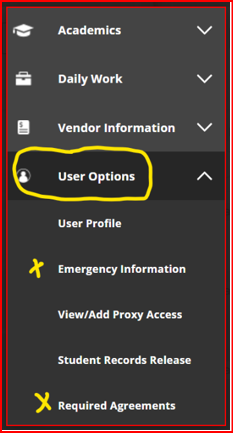
Update your Emergency Contacts (Time-Sensitive)
This is under User Options on the lower left side of your main LORA screen -- complete this at the same time as your Registration Agreement.
Math Placement (Time-sensitive)
We get more questions about math placement than any other topic. While Loyola admissions are SAT/ACT test-optional, test scores are gladly accepted for math placement. Most STEM Majors (science, technology, engineering, and mathematics), as well as Business Analytics, and all University Honors Program (UHP) students have math-sensitive degree-plans. If you have not chosen a STEM Major, or Business Analytics, and you are not in the UHP, you can likely skip this section.
If you are participating in one of the math-sensitive programs (or are thinking about changing to one), see below for more information on how you may already have math placement or how you can establish it if needed or if you should start the math ladder with College Algebra in your first semester:
Please take your time with this thorough outline -- it hits all of the questions!
NO MATH PLACEMENT NEEDED
Students in the below programs do NOT need to establish math placement. Your faculty advisor will be able to draft your first semester schedule without taking any math into consideration:
- Most business Majors except the Business Analytics concentration. Accounting, Economics, Finance, International Business, Management, and Marketing do not need to establish placement.
- Design majors (except for optional registration into COSCA211/Intro to Programming)
- Environment Majors with concentrations in either Humanities or Social Science. (Environment with Natural Sciences is math-sensitive.)
- Filmmaking Majors
- Humanities Majors: Classical Studies, English, History, all Languages, Philosophy, and Religious Studies
- Mass Communications Majors: Journalism, Advertising, Public Relations, Digital Communications, as well as the Online BA in Communications
- Music, Composition, Music Performance, Music Education, Music Therapy, and Music Industry Majors (Entertainment, Music Industry, Popular and Commercial Music, Urban and Electronic Music)
- Psychology Majors without the Pre-health concentration.
- Public Health Majors pursuing the BA
- Social Science Majors: Criminology and Justice, Political Science, and Sociology
- Theatre Arts and Dance Majors
- Exploratory Studies students intending to pursue any of the above
- - - - - - - - - - - - - - - - - - - - - - - - - - - - - - - - - - - - - - - - - - - - - - - -
PLACEMENT WELCOME, BUT NOT ESSENTIAL
Non-Honors Pre-Nursing Majors are encouraged to submit appropriate test scores that verify proficiency in College Algebra, or to arrive with credit for College Algebra, but they can also take College Algebra or MathT122 by the end of their first year at Loyola. They can also establish their proficiency via Loyola's ALEKS Math Exam+Online Learning Program.
- - - - - - - - - - - - - - - - - - - - - - - - - - - - - - - - - - - - - - - - - - - - - - - -
PLACEMENT NEEDED
- All Biology Majors regardless of concentration
- Business Analytics Majors
- All Chemistry Majors regardless of concentration
- All Computer Science Majors regardless of concentration
- Environment majors with concentration in Natural Sciences or Teacher Education
- All Neuroscience Majors regardless of concentration
- Mathematics Majors regardless of concentration
- Physics Majors regardless of concentration
- Psychology Majors with a concentration in Pre-Health
- Public Health Majors pursuing the BS
- Exploratory Studies students intending to pursue any of the above
- All University Honors Students regardless of Major
- - - - - - - - - - - - - - - - - - - - - - - - - - - - - - - - - - - - - - - - - - - - - - - -
1. WHAT WILL YOU HAVE BY THE TIME YOU ARRIVE? Loyola thinks about this in terms of the Math identified for each program's Loyola Core math class. Below are the math prerequisites organized by the target math classes required for the various math-sensitive programs.
- For most STEM Majors (both non-Honors and Honors), the math progression for the target class of Calculus is College Algebra, then Pre-Calculus, then either Calculus for Life Sciences or Calculus.
- For Business Analytics Majors (both non-Honors and Honors), the progression for the minimum-level target of Linear Algebra is College Algebra, then Finite Math, then Intro to Linear Algebra.
- For Honors who are not pursuing a STEM or Business Analytics Major, the math progression for the minimum-level target of Survey of Calculus is College Algebra, then Finite Math, then Survey of Calculus.
- - - - - - - - - - - - - - - - - - - - - - - - - - - - - - - - - - - - - - - - - - - - - - - -
2. PLACEMENT ESTABLISHED vs. PLACEMENT FULFILLED
ESTABLISHED:
Depending upon the Major, any students with any SAT/ACT scores, or credit-bearing scores from AP, Cambridge, CLEP, Dantes/DSST, IB, dual-enrollment, or transfer credits for...
...College Algebra, or Finite Math (sometimes called Contemporary Math), or Pre-Calculus...
...will establish their math placement with these items. All that's left to be done is to supply proof of the placement. As soon as Loyola has your documentation, your advisor will be able to schedule the next appropriate math needed for your degree. It is optional to use Loyola's ALEKS Math Exam+Online Learning Program to increase the established math placement level, but it must be done asap because students get a set of carefully-timed opportunities to study and re-assess to improve placement.
FULFILLED:
Depending upon the Major, some students with credit-bearing scores from AP, Cambridge, CLEP, Dantes/DSST, IB, dual-enrollment, or transfer credit for...
...College Algebra, or Finite Math, or Linear Algebra, or Survey of Calculus, or Calculus...
...will already have satisfied their Loyola Core math requirement if Loyola has received proof of the placement. Congrats!
Most higher-level maths will fulfill lower-level maths when allowed in the degree-plan: For example, a non-STEM student with proof of credit for college-level Calculus, can apply Calculus to the lower-level math class required for the non-STEM degree-plan.
- - - - - - - - - - - - - - - - - - - - - - - - - - - - - - - - - - - - - - - - - - - - - - - -
Question: "I have SAT/ACT and/or one of the above listed courses -- what does that mean to me?"
Answer: For more information about how your ACT/SAT/incoming credits work in your favor, see: 1) The Math placement grids which are organized according to the target-math requirement plus the corresponding needed ACT/SAT/ALEKS scores and/or 2) all of the Advanced Placement equivalency tables for the exams that we recognize, plus the corresponding needed scores.
ACT/SAT/ALEKS test scores do not give credit, but they DO establish placement.
- - - - - - - - - - - - - - - - - - - - - - - - - - - - - - - - - - - - - - - - - - - - - - - -
PROOF OF PLACEMENT
Placement via ACT/SAT scores, and/or AP, Cambridge, CLEP, Dantes/DSST, IB, dual-enrollment, or transfer credits requires submission of official score reports and/or official college transcripts from the college where the work was done. If dual-enrollment, this must also come from the college that sponsored the work (high school transcripts cannot be used for this purpose). For dual-enrollment or transfer, courses must be graded C or higher. Please have your official documents sent to Loyola University New Orleans. The providing agency usually provides a list of recipients from which to choose LUNO. If the agency sending the document/s wants an email address the address is admit@loyno.edu.
- - - - - - - - - - - - - - - - - - - - - - - - - - - - - - - - - - - - - - - - - - - - - - - -
NO PLACEMENT or LOW PLACEMENT? NO PROBLEM
- STEM, Business Analytics, or Honors students without any kind of incoming credit, and who were unable to schedule an ACT/SAT exam, or where their highest ACT/SAT math score does not place them in the desired math level, can either work through the pre-requisite courses needed to get to the target-math or can attempt to establish or change placement with Loyola's ALEKS Math Exam+Online Learning Program.
- For students who are certain that they need foundational work in mathematics, it may be appropriate and important to work through the courses. Students with some experience or who are close to the edge of a bracket, may benefit from starting Loyola's ALEKS Math Exam+Online Learning Program at their earliest possible convenience.
- Your math placement is a critical part of your first-semester registration: If your advisor does not have any proof of placement, they will schedule College Algebra to get you started on the progression asap. Again, this may be appropriate given individual math preparedness. Loyola's ALEKS Math Exam+Online Learning Program can be used to establish or to change placement -- students get 3 attempts with 48 hour breaks between attempts where a minimum of 5 hours of study in ALEKS must be completed. Therefore, the sooner ALEKS is started, the better the chance of being able to positively impact your score and your first semester schedule before school begins.
- - - - - - - - - - - - - - - - - - - - - - - - - - - - - - - - - - - - - - - - - - - - - - - -
EXEMPTIONS
- When required in the degree-plan, there is no exemption for Survey of Calculus or Calculus.
- Honors students are not eligible for any math exemption.
- Where the main math requirement is Math T122 or Math A115, some students may be exempted from those courses with an appropriate score on the SAT/ACT or Loyola's ALEKS Math Exam+Online Learning Program.
- Pre-Nursing students may be exempted from their foundational math course with an appropriate score on the SAT/ACT or Loyola's ALEKS Math Exam+Online Learning Program.
Students with Math exemptions must still fulfill the 3 credits reserved for Math with a different course.
- - - - - - - - - - - - - - - - - - - - - - - - - - - - - - - - - - - - - - - - - - - - - - - -
Special attention is called to the Miscellaneous Math Course Placement Grid (scroll down upon arrival at the next page) which addresses the target ACT/SAT/ALEKS test-scores needed to take, for example, COSC-A211/Intro to Programming, MATH-A260/Statistical Inference for Scientists, and/or two others. Students in Majors who otherwise would not require math placement, who may have interest in these courses (or have them as options in their degree-plans), should plan ahead.
English Placement (This sections explains Loyola's Composition and Writing About Literature conventions.)
In most Loyola degree-plans, students are responsible for a Composition course, as well as a separate, topical, Writing About Literature course.
- For students with Composition credit graded C or higher from dual enrollment or transfer, the next course/s to be taken at Loyola depend upon the convention observed at the previous school/s. Some students will already have fulfilled their requirement/s in this regard.
- Some schools have only a single Composition course like Loyola, while others observe a two-part Composition sequence.
- Students who successfully completed the Composition course from a one-course school will have satisfied the Loyola Composition requirement.
- Students who successfully completed and transferred the FIRST Composition course from a two-part school are presumed ready for Loyola's Composition requirement.
- If Comp I from a one-course school OR both Comp I and II from a two-part school were successfully completed and transferred, students are presumed ready for Loyola's Writing About Literature requirement.
Many schools have courses equivalent to Loyola's Writing About Literature. These courses WILL be transferable to the WAL requirements whenever possible.
Credit for all of the above is also awarded for certain AP, Cambridge, CLEP, Dantes/DSST, and IB exam scores.
- - - - - - - - - - - - - - - - - - - - - - - - - - - - - - - - - - - - - - - - - - - - - - - -
Other Placement Scenarios for the Composition Course:
For English Majors, the Loyola Composition course code is ENGL A205.
ENGL A205 is required of all incoming freshman English majors, regardless of AP or other credit by examination. All such AP credits will be counted as general elective credit for English majors. Students with college transfer credits equivalent to ENGL T122 and students changing their majors to English who have already taken ENGL T122 are not required to take ENGL A205.
Incoming students with Writing About Literature credit are still required to satisfy ENGL T122/ENGL A205 requirements.
Language Placement (Time-sensitive)
Many degree programs at Loyola require students to receive foreign language instruction.
Complete the placement assessment asap at the link/s below if you have any experience in French, Spanish, or Classical Latin or Greek.
There are other options for those with experience in American Sign Language, German, and Italian. Students may indeed place into the very beginning semester of a given language, but placement verification helps ensure that more advanced students start at the right level. Not every degree-plan requires language: Check your Major by clicking here, and then navigating to your College, then Academic Programs, then your Major, and then your Concentration if there's a choice.
Students with lots of experience, including *Heritage-Learners, may not have to continue in language, and doing the placement is how to find out.
- If you have any experience in French or Spanish at all, you must do the exam.
- Heritage learners of Spanish scoring into the A101 level or higher (248 or higher) and anyone scoring into the A201 level in Spanish or higher (score of 346 or higher), must also complete a short, informal, placement-call or zoom (or can stop by in person if local or visiting the area) to verbally confirm their level. Please address this as soon as can be -- don't wait: This may impact your schedule in your favor. Email Dr. Soto-Olson, dsotools@loyno.edu, after submitting the Spanish placement exam.
- *Heritage-learners include anyone who developed some proficiency due to exposure during childhood -- you may be able to understand the language, but not speak it; or speak, but not read or write it; or you may have proficiency in all areas.
- All are welcome to continue studying, and doing the placement is the way to find the right level. (When students are excused from language credits, they still have to make up the credits as General Elective credits.)
- Students who do not test, and who go into the wrong level (whether it be a higher or lower level than the class in which they are enrolled), may be asked to Drop or Withdraw, and start in the correct level at the next opportunity...
- Students only have through the 1st week of classes to Add courses, and through the 2nd week of classes to Drop (like it never happened). After that, the only option is to Withdraw by a given date each term (transcripts will show that the student was enrolled, and received a grade of W). The Academic Calendars show the dates and deadlines for both of these scenarios.
- Language is time-sensitive in additional ways:
- Language is a perishable skill: Most degree-plans have a 6 credit language requirement (2 semesters, a full year in most cases) where the first 3-credit course must be followed by a 2nd course in the same language, but at a higher level. Several Majors require a certain degree of proficiency which can mean more than 2 semesters for those without experience: Delaying your start means potentially forgetting things you once knew. Act on language as soon as possible.
- Do not wait to start your language sequence until the end of your career! Give yourself many semesters in advance to try again. When students wait to start the normal 2-class sequence in the Spring (especially their final Spring, when they intend to participate in the graduation ceremony), they must usually finish it the following Fall (after they've walked the stage). Do not delay this time-sensitive portion of your studies.
Any questions about placement or further placement-verification or placement for languages other than French, Spanish, Classical Latin, or Classical Greek, can be asked of the Languages and Cultures department or the instructors of our first year classes in other languages (American Sign Language, German, Italian).
PLEASE NOTE: Placement exams do not grant any credit.
If you have no experience, you do not have to test, but if you have any proficiency, no matter how small, please know that it is worth doing the exam/s. Those exhibiting appropriate proficiency may be waived from language requirements!
Official Bulletin Language Policy: http://bulletin.loyno.edu/regulations/academic-credit-and-placement#language-requirement-placement
Send Transcripts and Score Reports to Admissions via admit@loyno.edu (Time-sensitive)
Transfer and Advanced Placement FRIENDLY!
As you review and explore your draft registration, please keep in mind that Loyola accepts most academic transfer work graded C or higher, and we have a generous advanced-placement policy. See our generic transfer, dual-enrollment, and advanced placement grid here...
...and the very specific advanced placement equivalency tables here... https://bulletin.loyno.edu/regulations/academic-credit-and-placement
...and the overall transfer credits limitations policies here... https://bulletin.loyno.edu/regulations/academic-credit-and-placement#transfer-academic-credit-undergraduate
Regarding SAT/ACT scores (we are very happy to accept these for math placement, and it may save you a lot of time), dual-enrollment credit, transfer credit, Advanced Placement test scores (AP), Cambridge test scores, Dantes/DSST test scores, International Baccalaureate test scores (IB), and CLEP test scores:
As soon as possible, send your official score reports from the appropriate advanced placement agency and/or the final, official, transcripts (from the college where the classes were taken -- we cannot process these from high school transcripts).
- Some of the above will have you pick Loyola out of a list of possible recipients, but should any of them want an email address, these should go directly to our office of Admissions, admit@loyno.edu
Request Changes to your Draft Schedule (Time-sensitive)
Once you've made it into LORA, signed your Registration Agreement, and updated or affirmed your Emergency Contact info, use the graduation cap icon (Student Planning) to navigate to “Plan & Schedule,” then “Course Plan.” If your page is on the wrong Term, use the arrows to move to the current term. You've made it to your draft schedule!
All of the classes in which you are scheduled fulfill needed degree-requirements. Open your Progress tab, and click “Expand All” at the top to see how your current courses satisfy needs in your official degree-plan (and how we are using your incoming credits that were already sent).
The Loyola Core curriculum is explained at this link: https://bulletin.loyno.edu/undergraduate/cross-college-programs#loyola-core
FYS: First Year Seminar: The First Year Seminar Program is designed to introduce you to college-level work through the study of interesting topics drawn from a variety of disciplines. Credited with retention and higher first-term GPA, the FYS will initiate you in Loyola's culture of critical and collaborative learning. You will be connected with a professor who is committed to assisting in your transition to college, as well as help you meet other first-years. Most students take the course in the Fall of their first year. If not completed for any reason in the Fall, first-year students must complete a section the very next Spring.
Your current classes are a first effort to get you into the perfect schedule for your first term. If you believe you need different or additional classes, please follow the guidelines below, and please note that this the process you will follow for your first solo-registration for next semester -- good practice!
Your dedicated registration-advisor likely sent you the email that led you to this webpage -- after you Plan your proposed new/different courses in LORA as described below, reply to your registration-advisor in the same email thread letting them know you're interested in making a change.
1. Inside your Progress tab in LORA, click Expand All at the top. This is the program that matches the classes you take to the requirements they fulfill. Requirements will be displayed several ways: Click the Search button to the right of a requirement to display the matches.
2. You can also Search via the box in the upper right corner of the screen (very fast), or use the Course Catalog tab: Setting the filters in the Catalog will help eliminate unavailable courses and courses you cannot take from your search results: a) Set the Term, b) Location is Main (will block out courses reserved for other student populations), and c) Academic Level is Undergraduate (will block out Graduate-level courses).
When the results are returned, look to the left of the screen, and click the box for Open Sections Only
3. Courses being offered this semester will display a gray banner that says View Available Sections for… Click the banner to see more info.
4. Sections where the last 3 digits are Y _ _ are not available to main-campus students (for example, CRIM A110 YA1). Sections where the last 3 digits are W _ _ are aok, but note that these signify online-sections which are to be avoided in your first-term.
5. Inside the course listing, click on the course-code to see prerequisites, restrictions, and available seats. ONLY ask for courses for which you are eligible, and if seats are available. 5 / 30 / 0 means 5 seats are available out of 30 with no one waiting.
6. Loyola New Orleans does not place new students on waitlists in their first semester: This is to guarantee you real courses; to protect your financial aid if applicable; to keep you on track for graduation; to maximize your first-semester GPA; and to help ensure your best first semester ever. You will be able to Waitlist yourself in your second semester.
7. When you find an available section for which you are eligible, click Add Section to Schedule.
8. When you’re done searching and adding, navigate back to your Course-Plan, and use the Calendar-view to make sure that all of your time-slots line-up:
- Work through this area to eliminate any and all time-conflicts with other sections.
- When confronted with a conflict, use the button below each listing to View Other Sections of the same courses in the Calendar Grid, and keep Planning (and removing the conflicting courses) until it is perfect.
Again, when you're done Planning, email the advisor that sent you the onboarding email. When referring to courses, always give the entire course-code/s including the last 3 digits: For example, HIST-T122-001. HIST-T122 is not enough information.
For help with LORA, choosing classes, and related info, login to your SSO, and check your Canvas account for a class entitled LORA 101. Some of this is also covered in this Pan-American Life Student Success Center video: https://www.youtube.com/watch?v=8gUfan2gTUI&list=PLxFcxZmViR7H3lUttmxmy0ukk8EiMjG00&index=3
During the First Two Weeks
The Academic Calendar: What to do and WHEN (Time-sensitive)
Dates and deadlines matter: Bookmark this web-page that houses the Academic Calendars. Add semesterly details to the calendar you use in your daily life so you never miss a deadline or an opportunity. The calendar includes dates related to Adding, Dropping, Withdrawing, refunds, grades, holidays, final exams, and more...
- The formula for an on-time graduation is... 15 credits per semester: 15 credits x 2 semesters x 4 years is the 120 credits minimum needed for most undergraduate degree-plans...
- Missing a class? You can generally ADD courses to your schedule until the end of the 1st week of school (*see info about shorter-deadline sub-sessions below in Dropping vs. Withdrawing).
- Too many classes or have what you feel is the wrong class? You can generally DROP classes until the end of the 2nd week of school (*see info about shorter-deadline sub-sessions below in Dropping vs. Withdrawing).
- If you want or need to be a less-than-full-time-student this semester (11 credits or less), please contact your registration-advisor so that adjustments can be made, but speak with a Financial Aid counselor first. While 12 credits is the minimum full-time for Financial Aid purposes, it doesn't leave any wiggle-room should complications develop in any classes. If you only have 12 credits over the summer, reach out to your registration-advisor asap.
- If students start out at 12 credits, but go down to part-time before the primary Drop-classes deadline at the top of the term, this will also cause billing + Financial Aid issues (including with anticipated refunds for living expenses, depending upon the timing).
- If students start out at 12 credits, but go down to part-time before the primary Drop-classes deadline at the top of the term, this will also cause billing + Financial Aid issues (including with anticipated refunds for living expenses, depending upon the timing).
- Whether you need to Add or Drop in this special time (or both Drop and Add in order to stay at 15 credits), email your registration-advisor asap for help completing these actions. If you're urgently looking for a help on a deadline day, in addition to the person you've been working with all summer, cc registrar@loyno.edu to make sure it gets seen by someone who can do something.
Important Note: Once the DROP deadline passes, the only way out of the class is via Withdrawal. Please see the next section!
Dropping versus Withdrawing from classes (Time-sensitive)
Opportunities to refine your schedule each semester:
- Always check the Academic Calendars to ensure you're working with the correct dates -- there are *sub-sessions within the semester (1st and last 8-week sessions, for example) that have their own, different and earlier, key dates. If in doubt, check directly with the Registrar, registrar@loyno.edu
- As noted above, students can also DROP courses through the first and second week of school (again, beware of the sub-sessions -- their deadlines are usually much shorter). When students DROP courses, the courses do not appear on their transcripts.
- If a student stays in a course past the official Drop-deadline (whether it was for the regular semester or for a sub-session), but does not wish to finish the class for any reason, there is only one option remaining, which is to Withdraw from the course.
- Early in the career, when students have the least earned-credits, they are the most susceptible to Satisfactory Academic Progress issues (SAP issues).
- Where Financial Aid is concerned, Attempted Credits is the total number of credits remaining after the Drop-deadline.
- Loyola offers 2nd 8-week sessions to help those who had to Drop or Withdraw from a class earlier in the semester -- these classes start after midterms so midterm grades can be taken into consideration.
- Summer school is another way to catch-up on credits!
- Withdrawn courses WILL appear on transcripts with a "grade" of "W," but do NOT factor into GPA calculations.
- Withdrawals are an email away. See your college's Forms page for step by step instructions (Arts & Sciences, Business, Music & Media). Always put your full name and your campus-wide ID# in the Subject of any email you write at Loyola -- it will help us help you faster!
- The deadline for Withdrawals is near the end of the session or the semester (check the Academic Calendars for the exact dates, especially for sub-session dates).
- This allows students to know their near-final grade for a class and make an educated decision about whether there are enough opportunities remaining in the class to positively impact their grade, or whether it would be better to Withdraw in order to protect their GPAs.
- If you're urgently looking for a help on a deadline day, in addition to your faculty or SSC advisor, cc registrar@loyno.edu to make sure it gets seen by someone who can do something.
Satisfactory Academic Progress
1) A full-time student who drops to part-time after Add/Drop but during the legal Withdrawal period afterwards, has their full-time Attempted credits considered still-valid because they were Attempted beyond Add/Drop. Their aid package is unaffected, UNLESS...
2) ...they are an athlete: Athletes should check with their coaches and the registrar before Dropping or Withdrawing from classes. Aid and eligibility may be negatively impacted.
3) However: ALL students' Satisfactory Academic Progress (SAP) is calculated based off of their total credits at the END of a semester. A student must complete at least 66.7% of the credits they Attempted or they are at risk of losing financial aid options. The formula is total hours Earned divided by total hours Attempted. See the Pan-American Life Student Success Center link here and the University Bulletin link here.
4) Again: Depending on the timing, students may still be able to pick up courses in the 2nd 8-week sessions.
Later in the First Semester
After the Drop-classes deadline, departments and programs may make updates to student advisor-advisee assignments:
You may be reassigned from your original advisor (who prepared your first schedule) to your next or permanent faculty-advisor or departmental-advisor.
You can find the name of your current, new, and/or additional advisor/s (if assigned) in your LORA account through the Single-Sign-On. Look for the LORA Self-Service tile.
Registration-Advising & Scheduling
Your original advisor will have helped make your first schedule for you. Going forward, there is a different process.
- Course-offerings for next semester will appear in LORA: This usually happens mid-semester. Check the Academic Calendars for the start of Registration-advising, and see this Registration page for other important dates, including when you can personally register, how to deal with registration holds, tips for using LORA, as well as additional links to advising information, student success, accessibility services and accommodations, tutoring, coaching, workshops, and more. These are great pages to bookmark.
- Put some of these dates on your calendar, and well in advance of Registration-advising, plan a consultation with your departmental faculty advisor or your Pan-American Life Student Success advisor. Many advisors send a "sign-up" email to their students -- check your Loyola email regularly to ensure you don't miss an invitation.
Before your meeting, Plan a working schedule to propose to your advisor via your LORA account under the Course Plan tab: A working schedule means ensuring there are no issues with the courses you propose, including no time-conflicts (classes that overlap each other), no prerequisite issues (courses that require that the student had a preparatory class in advance of the desired course), and lastly, that there are actually seats available in the desired course/s.
1. From inside your Progress report, you will see named requirements, or lists to choose from, or requirements will offer you a Search button to the right of the requirement.
2. You can also search via the Course Catalog tab in LORA: Set the filters to show you ONLY classes for which you may be eligible: a) Set the Term, b) set the Location to Main if you usually attend classes in person on campus or set this to Online if you are a member of the City College, c) and set the Academic Level to Undergraduate or Graduate as appropriate.
3. The course-catalog displays every course ever taught, so only click on the gray-bars labeled View Available Sections for… If that wording isn’t there, the course is not being offered. Be sure to click the gray-bar, or you’ll miss the actual sections with their days and times.
4. Inside the course-listing, click on the hyper-linked course-code to see prerequisites and restrictions. If you do not meet the prereqs or the restrictions, it generally means you cannot take the course yet. Consider scheduling the preqrequisite course instead, and discuss with your advisor.
5. Make note of course capacity in the left of each listing: 5 / 30 / 0 means 5 seats are available out of 30 with no one waiting. If the Section has 0 seats or is labeled Waitlisted, that course is not available. You can indeed Waitlist yourself for courses in your 2nd semester, but be sure to read that section of this guide below. There are some tips for helping to ensure you get your seat.
6. When you find an available section of interest, click the button labeled Add Section to Schedule – depending on how you navigated to the course, you may have to choose the semester again.
7. At this point, you have only Planned the course. You won't be able to self-register until your advisor clears you for registration. It also has to be your designated time to register -- check the Registrar's timetable. When discussing classes with your advisor/s over email, refer to the entire course-code/s including the last 3 digits, for example: SUBJ - _### - _ _ _ (NOTE: Sections ending in Y _ _ are only available to students in the City College.)
8. You will also need to accept each semester’s official “Registration Agreement” before you’ll be allowed to register, as well as affirm your emergency contact information.
9. Check with your advisor if in doubt about anything, heed their advice, follow-up on any thumbs-up or down feedback they give you through your LORA account's Course Plan, and check to see if all of your work has landed in the right places on your Progress tab.
10. Once school starts, clean up your Course Plan -- eliminate any Planned courses that you will not sign up for in a given term so that your Progress report remains accurate.
Most holds will need to be resolved prior to registration (see the Notifications icon on your splash page in your LORA account). Some holds do NOT restrict registration (Transcript Holds), but others do. Contact the office/s listed to try and resolve your hold as soon as possible -- make this a priority. Delaying may cause you to miss out on classes you wanted to take.
BUT WAIT! How will you know what courses to choose? Presenting…
Degree-tracking (How to Graduate)
Degree-tracking just means knowing your status relative to graduation. Most programs display a digital and interactive version of a student's degree-requirements in their LORA account under the Progress tab. The Progress tab matches the courses you take to the requirements they fulfill, but it also offers lists of eligible courses per requirement, assists in requirement searches, and displays actual degree-progress, credit-counts, GPAs, and more.
Degree-plans are also written out in the annual Bulletin and the Bulletin Archives according to college and catalog year (the year a student starts at Loyola).
Most important of all: Do not wait to set up the Registration-advising meeting with your advisor -- delaying may cause you to miss out on classes you wanted to take.
When you're ready, see this link for more information about your Progress tab and graduation.
How to find classes that fulfill the Loyola Core "Knowledge/Values" requirements
- Some classes in your degree-plan are very specific named courses like ENGLT122 or SCIET129. You must take an exact class to satisfy the requirement. Other items are categories, like "Creative Arts and Cultures" or "Writing About Literature." For the category-classes, you can often choose between several courses in several departments. See this curriculum link in the Bulletin for more about the Loyola Core requirements: https://bulletin.loyno.edu/undergraduate/cross-college-programs#loyola-core
- Navigate to LORA Self-service through the Single-Sign-On to view class options versus your own degree-plan needs. Use the Course Catalog within your LORA account, and see the drop-down for Course-Type. This will take you to the offerings by category/requirement.
- As a general rule of thumb, A-coded courses, for example, SUBJ-A-###, almost never count for the Loyola Core (there are a few exceptions in the Science Majors and in Honors).
- Be sure to check how all of these land in your Progress report -- if a Planned course isn't where you thought it would go, investigate further -- search again, or talk to your advisor if you get stuck.
How to Work the WAITLISTS (for your first solo registration in your 2nd semester)
Loyola's database automatically contacts students (by email at the Loyola email address) who have progressed to the next available seat.
***The student will be given a time period to self-register or to reach out to the registrar (registrar@loyno.edu) for assistance if any difficulties occur.***
If an ineligible student is on a waitlist, the system will not enroll them automatically. It will help to understand why any difficulties might occur in case those situations can be avoided completely: If self-registration is not possible for one of the below reasons, and if resolution does not occur in the time-period allowed, the database will automatically pass over students who are ineligible to take their waitlisted course, and assign the section-seat to the next eligible student on the waitlist. Faculty and staff with advising responsibilities should verify that students are actually eligible to enroll for a seat in the section prior to any advisement encouraging the use of waitlists.
The system will not process a waitlist enrollment in the following situations, and the available-time will expire if there's no intervention:
- The student is on the waitlist, but their advisor has not cleared them to register
- The student is on the waitlist, but they do not meet the prerequisites or restrictions for the section
- The student is on the waitlist, but they have university holds on their record that prevent them from registering
- The student is on the waitlist, but is already enrolled in a different section of the same course
- The student is on the waitlist, but has a time conflict with the waitlisted section
- The student is on the waitlist, but there is no room in their schedule to add more credit hours without going over the maximum (overload)
- The student is on the waitlist, but they have selected a SUBJ - _ ### - Y _ _ where the Y signifies reserved for students of City College (the Online college), but the student is a main-campus student (and vice versa for SUBJ - _ ### - W _ _, where the W signifies reserved for main-campus students).
- The student is on the waitlist for both a lecture and for a lab -- these courses have to be registered simultaneously, so if the lecture comes through, but the lab is still waiting, it will skip over the student.
Because deadlines are real...
https://academicaffairs.loyno.edu/registrars-office/academic-calendars
...and requests for late adds, late drops, late withdrawals, etc. will not be considered, email registrar@loyno.edu for help asap if you get contacted about a seat, but have difficulty enrolling because of one of the above conditions or if you get an error message while attempting to secure said seat. Students who miss their opportunity have to get back on the waitlist, and wait again, but impending deadlines may prevent further progress in this regard. Students should always secure guaranteed seats when possible.
How to Get Things Done During your College Career
For additional help as an established student, see and bookmark this How-To-Everything page:
https://cas.loyno.edu/get-things-done/cas-forms-online
Don't skip class or lunch waiting in lines or walking the campus for assistance -- see instructions, forms, shortcuts, and more for all the normal business of being a student. While the contact information provided is for College of Arts and Sciences students, the general advice is the same for College of Business, and College of Music+Media, and there are links for contacting Business and Music+Media advisors directly.